Bubly: A Modern Handwritten Font for Elegant Web Design
Bubly in a Creative Portfolio Hero Section
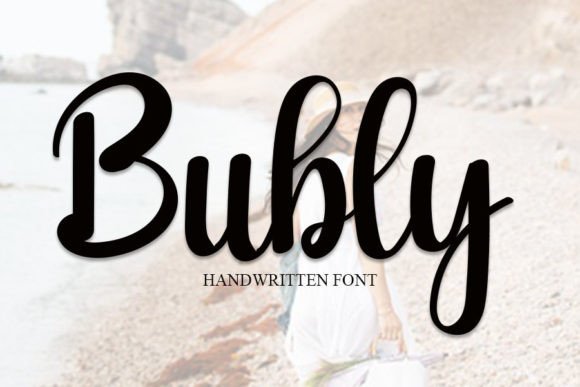
I recently started working on a personal portfolio site for a freelance illustrator who wanted a digital presence that felt both professional and expressive. As I explored different script handwritten fonts, Bubly immediately stood out. Its balanced weight and clean flow gave it a modern edge without losing the warmth of authentic handwriting. I dropped it into the hero section, pairing it with a soft image background of watercolor textures. The result? Instant personality. Bubly’s subtle bounce and rhythm made the headline feel alive, and the spacing worked well even at larger sizes. It wasn’t too delicate to get lost on mobile, nor too bold to feel overwhelming on desktop. The font just fit, like it was made for this kind of creative showcase.
Why Bubly Works for Boutique Online Stores
When designing for a small boutique client, I needed a font that could carry both product names and short promotional text. Bubly, as a handwritten script font, gave the brand a boutique feel—think curated packaging, personalized notes, and warm customer service. I used it sparingly for product tags and section headers, pairing it with a clean sans serif for body text. This contrast helped maintain readability while still keeping the brand voice consistent. The font’s natural variation in stroke weight added visual interest without distracting from the product visuals. On mobile, I adjusted the letter spacing slightly to prevent any overlap, and it rendered beautifully across both iOS and Android browsers.
Bubly for Course Sales Pages and Digital Branding
For a new online course landing page, the goal was to build trust while keeping the design approachable. I used Bubly for the main headline and instructor name, where a human touch was essential. The font’s classic calligraphy influence gave it a polished edge, making the brand feel more established and intentional. I made sure to avoid using it in long paragraphs—this is a display font at heart, best suited for short, impactful text. When building the brand kit for the client, I included Bubly as the primary accent font, especially for quote graphics and social media headers. It scaled well on both web and print assets, and the included alternates allowed for subtle variation when repeating the font across different pages.
Readability and Responsiveness with Bubly
One of the first things I check when testing a script handwritten font like Bubly is how it behaves on mobile screens. I previewed it at different viewport sizes and found that it maintained clarity even at smaller headline sizes. However, I noticed that on dark backgrounds with light text, the font’s thinner strokes occasionally got lost, especially in lower-resolution displays. To fix this, I slightly increased the font weight and added a subtle text shadow in CSS. This helped preserve contrast and readability without compromising the font’s elegant character. I also tested it over image overlays and found that a semi-transparent background box improved legibility when placing Bubly directly on top of busy visuals.
Font Pairing Tips for Web Designers Using Bubly
Bubly shines brightest when paired with a clean, minimalist font. I often use it with a modern sans serif like Inter or Lato for body copy, creating a strong visual hierarchy. For more editorial-style layouts, like blog headers or campaign pages, I’ve successfully paired Bubly with serif fonts such as Playfair Display, which complements its classic calligraphy roots. The key is to let Bubly be the star of the show—use it for headlines, logo text, or short calls to action. Avoid stacking multiple decorative fonts underneath it. Instead, keep supporting text simple and functional to maintain a professional, user-friendly design.
Bubly for Logo Design and Social Media Graphics
When a wellness coach approached me to design a logo and supporting social media templates, I considered Bubly for the brand name. Its modern vibe and clean form made it ideal for a logo that needed to feel both personal and polished. I exported the text as an SVG and used it across the homepage, favicon, and Instagram story templates. Since Bubly is a premium font with multilingual support and multiple file formats, I was able to use it confidently in both web and print deliverables. The font’s versatility also made it a great choice for quote graphics and promotional banners, where a touch of elegance helped elevate the brand’s visual presence.
Checking Webfont Compatibility and Licensing
Before embedding Bubly into any live site, I always double-check the webfont files and licensing terms. Most platforms offer WOFF and WOFF2 formats, which are optimized for fast loading and broad browser support. I tested Bubly on Google Fonts and a custom hosting setup, and both performed well. When working with clients, I make sure to confirm that the font includes a commercial license—this avoids any legal issues down the line, especially for online stores and SaaS landing pages. I also check for alternate glyphs and ligatures, which can add a unique touch to hero text or logo variations without needing to switch fonts.
Using Bubly in Email Newsletters and Digital Ads
I was curious how Bubly would render in email clients and online banners, so I created a sample campaign using the font in a hero header and call-to-action button. Since email clients have limited font support, I used fallback fonts like cursive and handwriting in the CSS stack and included a background image version for clients that block webfonts. For digital ads, I exported Bubly as a PNG overlay and embedded it in the ad creative. The font’s clean lines and modern curves made it ideal for a lifestyle brand campaign that needed to feel authentic yet refined. It performed well across both desktop and mobile ad formats, drawing attention without feeling forced.